Google Vids turns Veo into a free entry point
Google Vids just got Veo 3.1 for any Google account, but the bigger story is the bundle: free clips, Chrome recording, YouTube export, and a tier chart with trust issues.

 ainewssilo.com
Google is not selling Veo 3.1 here as a precious model SKU. It is stuffing it into the easiest surfaces to reach.
Google has found a funny way to distribute Veo 3.1: tuck it inside the office video app.
That sounds less glamorous than a model launch. It is also probably smarter.
As of this week, Google says anyone with a Google account can generate video clips in Google Vids with Veo 3.1, with 10 free generations per month. The same rollout adds direct YouTube publishing and a Chrome screen recorder at no additional cost, while paid Google AI and Workspace tiers get richer extras like custom music from Lyria 3, AI avatars, and much higher generation limits.
That combination is the story. Google is not treating Veo 3.1 like a precious lab demo. It is turning the model into a distribution feature inside a product people can reach from vids.new, a browser toolbar, and the Google account they already use for everything else. Benchmark bragging is fun, but distribution pays the bills.
Google Vids now puts Veo 3.1 in front of any Google account
The official Google Blog post is unusually blunt about the headline: anyone with a Google account can now generate high-quality clips in Vids at no cost, and personal accounts get 10 video generations every month. Users can create from a text prompt or from a photo, then drop the result straight into the Vids timeline.
That matters because Vids is not a niche model playground. It is Google’s collaborative video editor, the one that already bundles templates, stock media, teleprompter support, voiceovers, and team sharing. The product page still frames it like workplace software, but this week’s update drags consumer AI energy directly into that surface.
The help docs add the practical limits. Generated clips run at 24 fps and 720p. They can be landscape or portrait. Image-to-video clips are eight seconds long. You can also feed up to three reference images into some workflows to keep characters, objects, or style more consistent across clips. This is real product access, but still tightly packaged product access.
If you already read our piece on Google’s Veo 3.1 Lite pricing push, this is the other side of the same map. One lane cuts model cost for developers. The other pushes the model into a mainstream editor where normal humans, marketers, students, and side-hustle gremlins can actually touch it.
How free Google Vids really is depends on which Google you pay
Here is where Google’s documentation starts doing that charming enterprise thing where three pages agree on the broad story and then quietly disagree on the math.
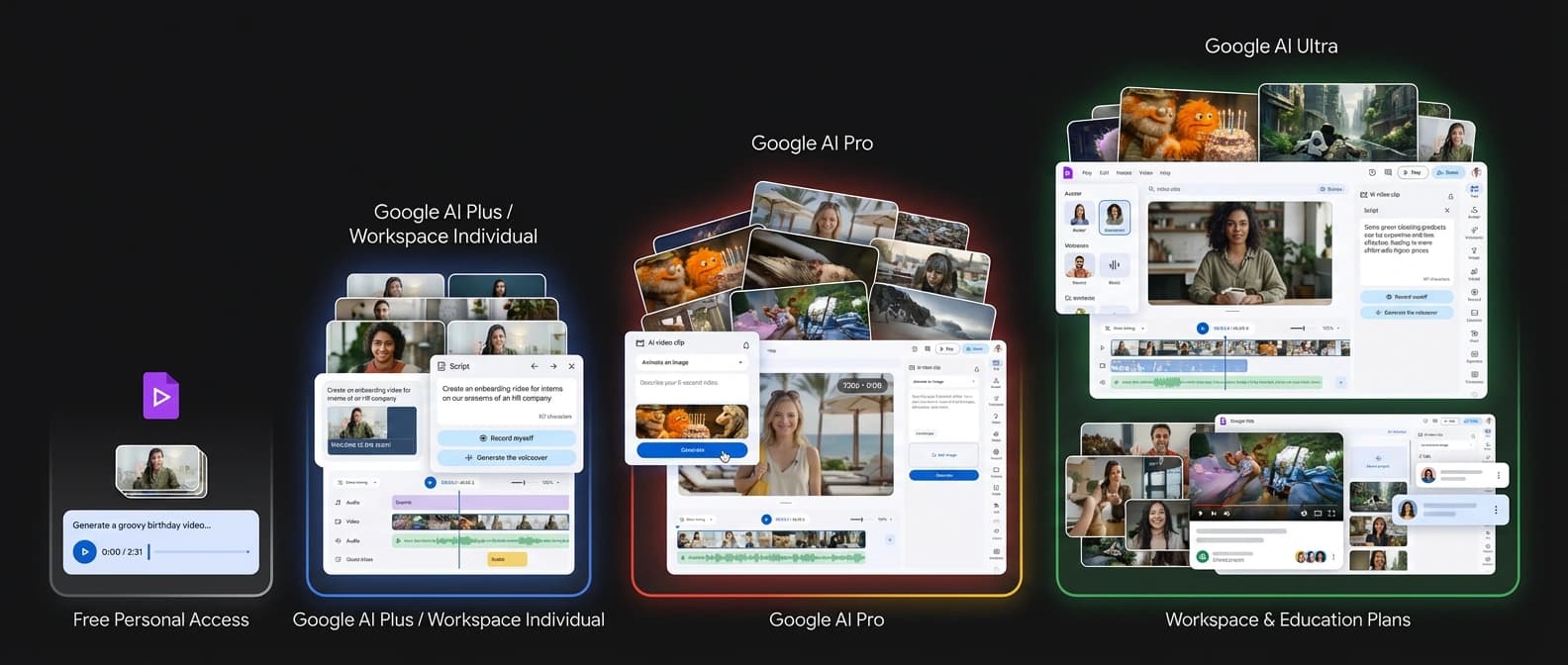
For a plain personal Google account, the launch post says 10 free video generations per month. The availability page phrases that as 50 monthly credits, with AI video costing five credits per use. Same outcome, different spreadsheet costume.
For Google AI Plus and Google Workspace Individual, the help page shows the same 50-credit structure. Google AI Pro jumps to 50 videos per month. Google AI Ultra, which the docs list as USA-only, goes all the way to 1,000 videos per month. On the work and school side, the tiers split again: some Business, Enterprise, Nonprofit, and Education accounts have temporary promotional access through at least May 31, while higher plans and add-ons carry their own monthly caps.
That is why the phrase "free for everyone" needs a footnote.
The how-to page for AI video still opens with “this feature requires an eligible Google Workspace subscription,” even though the newer launch post and availability matrix explicitly list personal Google accounts. I would not call that a contradiction so much as a documentation pileup at highway speed. The practical takeaway is simple: consumer access is real, but the exact ceiling depends on whether you are on a free personal account, an AI subscription, a Workspace plan, or an education tier with temporary promotional access.
The safe version is this: Google Vids is free to try, not unlimited to use. Anyone selling this as a limitless giveaway is reading the marketing and skipping the tariff schedule.
The bundle matters almost more than the model
What makes this rollout interesting is not just that Veo 3.1 shows up in Vids. It is everything Google wrapped around it.
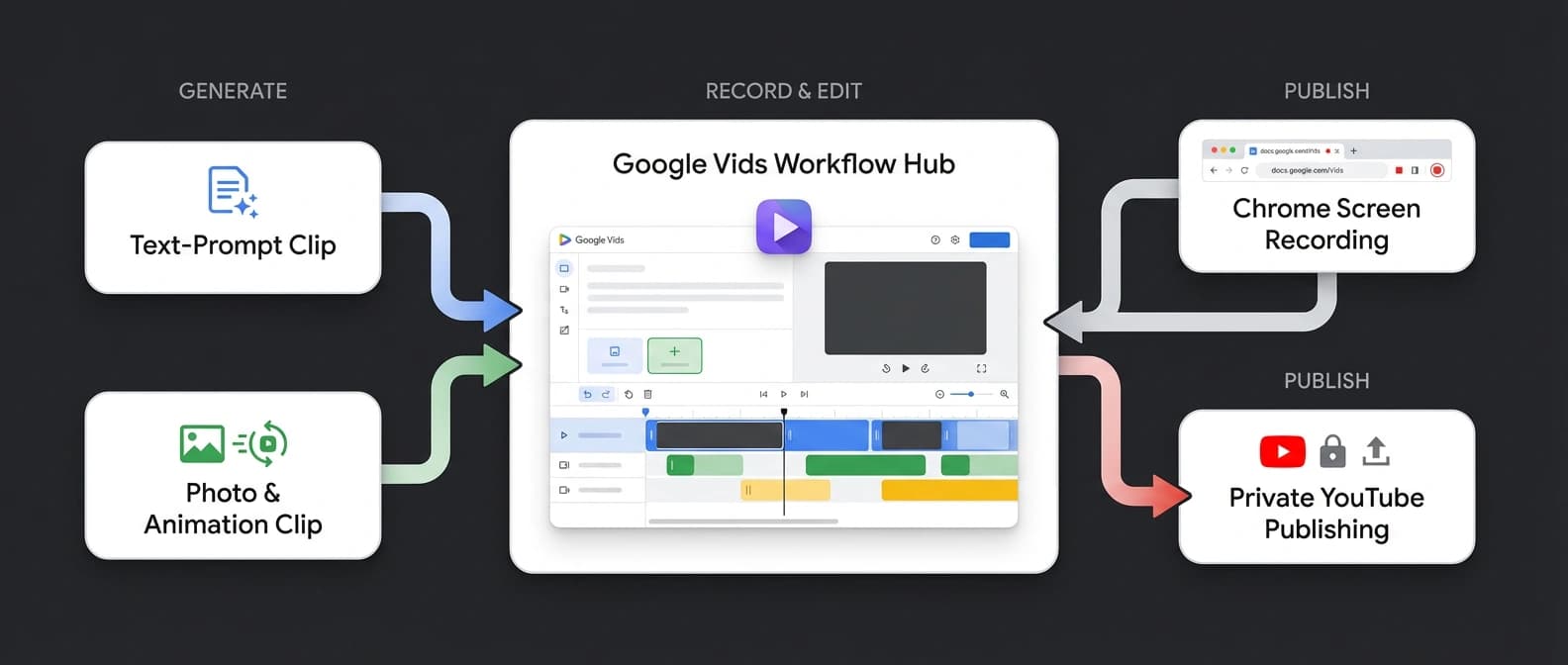
The new Google Vids Screen Recorder lets users capture screen, camera, audio, or combinations of all three from Chrome, then open the recording directly in Vids for editing and sharing. Google says recordings can run up to 30 minutes and the extension is available at no additional cost for personal and Workspace accounts. That turns Vids into more than a prompt box. It becomes an intake layer for tutorials, bug reports, walkthroughs, and the eternal corporate species known as “quick async update.”
Then there is YouTube export. Vids can now publish finished videos directly to YouTube, with exports defaulting to Private. Again, this is not a benchmark story. It is workflow plumbing. Google wants creation, editing, recording, and distribution to happen without the user wandering off to three other tools and developing independent thoughts.
The paid extras reinforce the same pattern. Google AI Pro and Ultra users get custom music generation powered by Lyria 3 and Lyria 3 Pro. The Workspace Updates post says that ranges from 30-second clips to three-minute tracks, with separate limits by plan. Google also added more directable AI avatars, but availability is narrower there too: avatars and some avatar-as-ingredient workflows are limited by account type, language, and in one case region.
This is the bit I keep coming back to. Google is packaging Veo 3.1 less like a luxury model SKU and more like an answer to a very ordinary question: can I make the video here, record here, score it here, and ship it from here? The answer is increasingly yes, which is a much more dangerous product answer than “our model got two points better on a leaderboard.”
It fits the same instinct we saw in Google AI Studio’s full-stack distribution play: own more of the route from generation to finished output.
Google Vids still comes with fine print, and some of it is in faint pencil
This is not Google giving the public a Hollywood studio in a browser tab.
The clips are short. Resolution is 720p. The product page still says Vids videos top out at 10 minutes overall. Many AI features in Vids remain English-only, including help-me-create flows and templates, while voiceovers and avatars have a narrower language list. Google AI Ultra is marked USA-only. Work and school accounts can lose access if an admin turns features off. And the help page says generated images and videos are “for use only within Vids,” which is a funny thing to say during a week when Google is also promoting direct YouTube publishing. Somewhere inside Google, two documents are having a spirited disagreement over what “within” means.
Google Vids is not suddenly the final form of AI video. What it is, very clearly, is a distribution engine. Free personal access gets people in the door. Chrome recording keeps them inside the workflow. YouTube export gives them somewhere obvious to send the result. Paid plans raise the caps and add music, avatars, and more ambitious usage. The tier chart looks like it was designed by a committee paid per cell, but the strategy underneath it is easy to read.
Google is taking a high-end video model and hiding it in plain sight, inside the boring workhorse app with the lowest friction. That may be the most important Veo move it has made this month.
Source file
Public source trail
These links anchor the package to the underlying reporting trail. They are not a substitute for judgment, but they do show where the reporting starts.
Official Apr. 2 launch post confirming 10 free monthly Veo 3.1 generations for personal accounts, YouTube export, the Chrome extension, Lyria music, AI avatars, and 1,000-video caps for AI Ultra tiers.
The key tier matrix source for separating personal, AI Plus, AI Pro, AI Ultra, Workspace, nonprofit, and education access, plus the May 31 promo window and language caveats.
Confirms Veo 3.1 clip specs, 720p/24fps output, eight-second image animation, ingredient references, and the documentation mismatch around who can access AI video clips.
Official music rollout post covering Lyria-powered music generation, supported Workspace and consumer tiers, and promotional higher limits for Workspace customers.
Product framing for Vids as a collaborative AI video editor, including teleprompter, voiceovers, max 10-minute video length, and the note that several AI features and templates remain English-only.
Confirms the extension exists, is updated this week, supports screen, camera, and audio capture, runs up to 30 minutes, and routes recordings straight back into Vids.

About the author
Idris Vale
Idris writes about the institutional machinery around AI, but the lens is broader than policy alone: procurement frameworks, public-sector buying rules, platform leverage, compliance burdens, workflow risk, and the market structure hiding beneath product or infrastructure headlines. The through-line is practical power, not abstract theater.
- 23
- Apr 10, 2026
- Brussels · London corridor
Archive signal
Reporting lens: Follow the buying process, not just the bill text.. Signature: Policy turns real when someone has to buy the system.
Article details
- Category
- AI Products
- Last updated
- April 11, 2026
- Public sources
- 6 linked source notes
Byline
Tracks the institutions, incentives, and market structure that quietly decide which AI systems get deployed and why.